DMARC Peek

The DMARC report in your inbox, in plain English.

Share a DMARC report from Mail and see who is sending as your domain, what passed, and what needs fixing. On iPhone, iPad and Mac.

Download DMARC Peek on the App Store

Coming soon to the App Store.
Requires iOS 26, iPadOS 26 or macOS 26 or later.

example.org

Reported by Google, 12–18 October

Needs attention

2,231 of 3,104 messages failed DMARC. Your policy is p=none, so they were delivered anyway.

  • Critical Unrecognised server sending as example.org 1,960
  • Warning Amazon SES isn’t aligned with your domain 214
  • Policy Policy is monitoring only p=none

Every day or week, Google emails you a zip full of XML about your domain. It says who is sending mail as you, and whether they should be. It's XML, it's hard to read, and easier to ignore.

DMARC Peek shows you what's what.

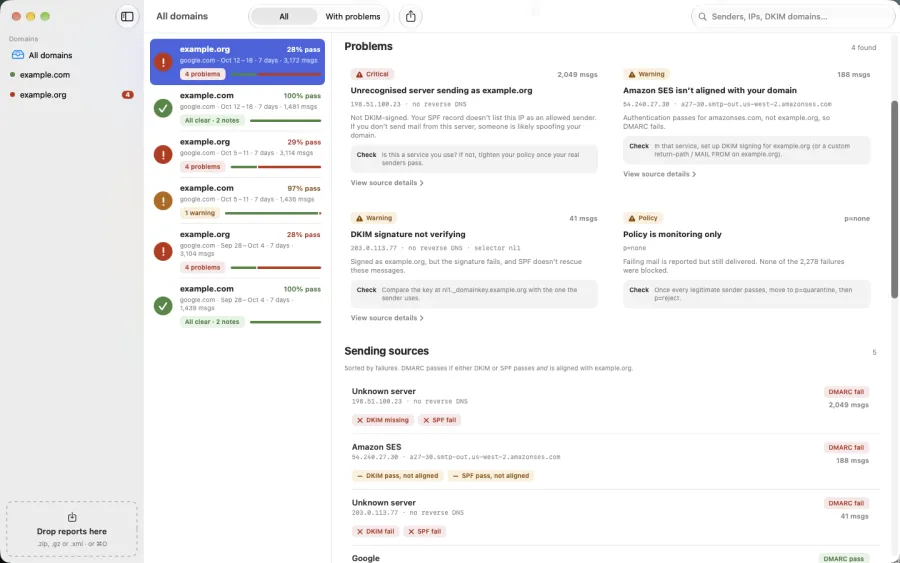
DMARC Peek on Mac: domains, weeks of reports, and a report's sending sources with DKIM and SPF results for each.
Mac
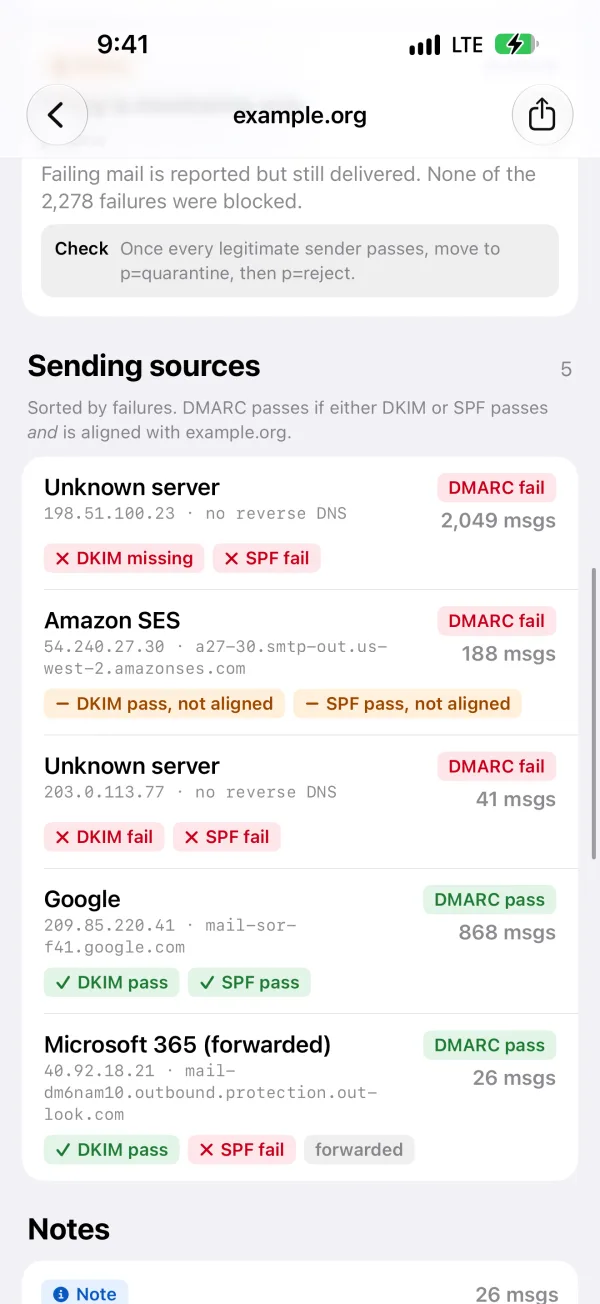
DMARC Peek on iPhone: every server sending as the domain, with DMARC, DKIM and SPF results.
iPhone
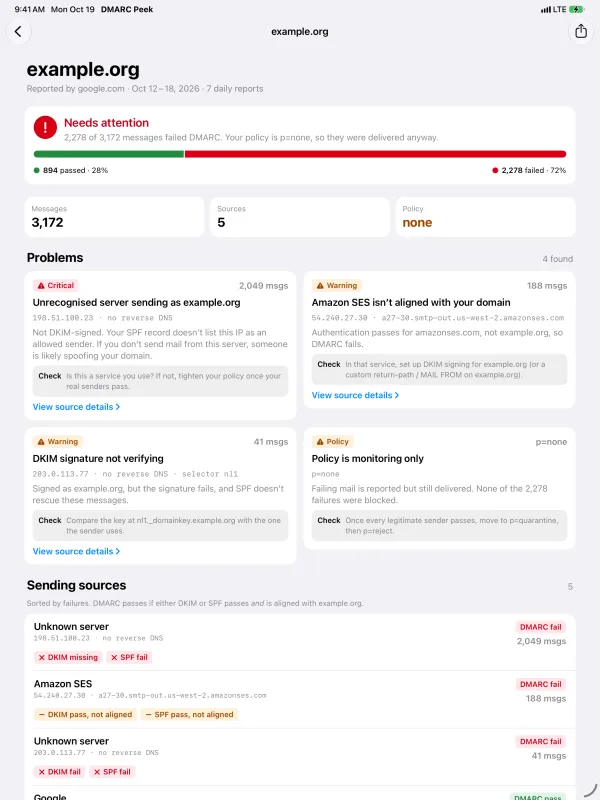
DMARC Peek on iPad: a report's sending sources, sorted by failures.
iPad

What it does

Share straight from Mail
Long-press the attachment, tap Share, pick DMARC Peek. Zipped, gzipped or plain XML: it’s unpacked on your device and opened in a second.
A verdict, not a spreadsheet
All clear, worth a look, or needs attention. How many messages passed and failed, and whether your policy let the failures through.
Problems, ranked
Unrecognised servers sending as you, services that aren’t aligned with your domain, DKIM signatures that don’t verify, a policy that only monitors. Each with what to check next.
Senders named
Reverse DNS turns IP addresses into names, and only trusts a name that points back to the same address. Google, Microsoft 365, Amazon SES and other common services are recognised.
Daily reports, weekly view
Google can send a report per domain per day. DMARC Peek keeps each one and rolls them into a week, so a problem doesn’t hide across seven files.
Search inside your reports
Find a sender by part of its IP, host name, provider or DKIM domain, across every report you’ve imported.
Drill into any source
See which check failed and why, in plain words, with the raw <record> underneath when you want the detail.
Built for messy reports
Wrapped XML, missing reporter names, odd gzip files, thousands of senders in one day. Real reports are untidy; DMARC Peek reads them anyway.
Drag, drop, ⌘O Mac
Drop a pile of report files on the window, or open them from Finder. A three-pane layout shows domains, weeks and detail side by side.
Share a summary
Send a plain-text summary of a week’s problems and sources to whoever manages your DNS or email service, straight from the share sheet.
A reader, not a monitoring service

DMARC Peek doesn’t ask for an account, read your mailbox or change your DNS. You hand it a report, it tells you what the report says. Fixes happen where they always have: in your DNS and with your email providers. Reports stay on your device.

  • Zeroaccounts or sign-ups
  • On devicereports never uploaded

Open the report you’ve been ignoring

Download DMARC Peek on the App Store

Coming soon to the App Store.
Requires iOS 26, iPadOS 26 or macOS 26 or later.

Questions

What is a DMARC report, and why am I getting them?

If your domain publishes a DMARC record with a rua= address, mail providers such as Google and Microsoft send that address a daily summary. It lists every server that sent mail claiming to be from your domain, how many messages, and whether they passed SPF and DKIM. It arrives as a zipped XML file, which is why it usually goes unread.

Why did you build this?

For the same reason why you might want to use it. I have a domain, send email, and security is important to me. If you've ever tried to open DMARC reports from Apple Mail on an iPhone, you know that it's a pain with multiple steps and XML (which has never been the most readable format to begin with) filled with hard-to-remember acronyms and codes. Sometimes you just want to know what's going on without jumping through hoops. Alternatives involve downloading the reports from mail, going to websites, uploading those same files, then being prompted to sign-up for expensive services I don't need, or need paid apps with enough steps to make it frustrating. I wanted to just look at a report and make sure everything's good, and I wanted that process to be quick 'n' easy. Voilà, DMARC Peek.

How do I get reports into the app?

On iPhone or iPad, long-press the attachment in Mail, tap Share, then choose DMARC Peek. You can also open .zip, .gz and .xml files from the Files app. On a Mac, drag files onto the window, use File › Import Reports (⌘O), or choose Open With from Finder.

Will it fix my DMARC setup?

No. DMARC Peek is a reader. It points out what looks wrong, such as a service that isn’t signing with your domain or a policy that doesn’t block anything, and tells you what to check. The changes themselves are made in your DNS and in your email services’ settings.

Which reporters does it understand?

Any aggregate report in the standard format (RFC 7489), including the newer DMARCbis variant. It has been tested with real reports from Google, Microsoft, Mimecast, Fastmail and a range of corporate mail gateways.

If you have a report that DMARC Peek can't read, feel free to send an anonymized version my way and I'll see what I can do to make it work!

Does it send my reports anywhere?

No. Reports are read and stored on your device. The only network traffic is optional reverse DNS lookups, which ask your network’s DNS server for the name behind each sending IP address. You can turn lookups off in Settings. There are no analytics and no accounts. See the privacy policy. Your data is not my business. I don't want it.

Why does a report say “inconsistent”?

Occasionally a reporter contradicts itself: it records a DKIM or SPF pass for your own domain, then counts that message as failing DMARC anyway. That’s a fault in the report, usually a reporter bug or an anonymised sample, not in your setup. DMARC Peek labels it rather than guessing.

Do my reports sync between devices?

Nope. Each device keeps the reports you open on it. I can add that if enough folks find it useful!

How much is DMARC Peek?

It's free. No purchases, no subscriptions. There's a tip jar if you love the app, but otherwise I'm just happy you're using it!